
LTMS Phone Verification Not Working? How to Fix Update (2026)
If your LTMS phone verification is not working, do not panic. In most cases, the problem is one of three things: the mobile number on the account is wrong or outdated, the verification code is delayed or filtered, or the LTMS side is not sending the code properly. LTO’s own client care materials show that account verification and correction of mobile or phone number are real support cases, which means this is a known type of problem, not just user error.
Phone verification trouble is also something users have been reporting in the wild for a while. Community posts show people repeatedly asking why LTMS mobile verification codes are not arriving, even after multiple attempts. That does not prove every case is a portal issue, but it does show you are not the only one dealing with it.
What This Usually Means
When a verification code does not arrive, the most common causes are a weak mobile signal, a wrong or inactive number, message filtering or blocking, delivery delays, or using an old code after requesting a new one. These are standard OTP problems across major platforms, and they fit what LTMS users usually experience too.
For LTMS specifically, the bigger issue is often the number saved on the account. If your old number is still attached to your profile, or if your account needs manual verification, retries will not fix the problem by themselves. LTO’s client care service list explicitly includes account verification and correction of mobile or phone number.
You can also read: How to Change Your LTMS Email Address Latest Update (2026)
Do These Checks First
First, wait a few minutes and request only one fresh code. Verification codes can arrive late, and requesting too many can make older codes useless. Use only the latest code sent to you.
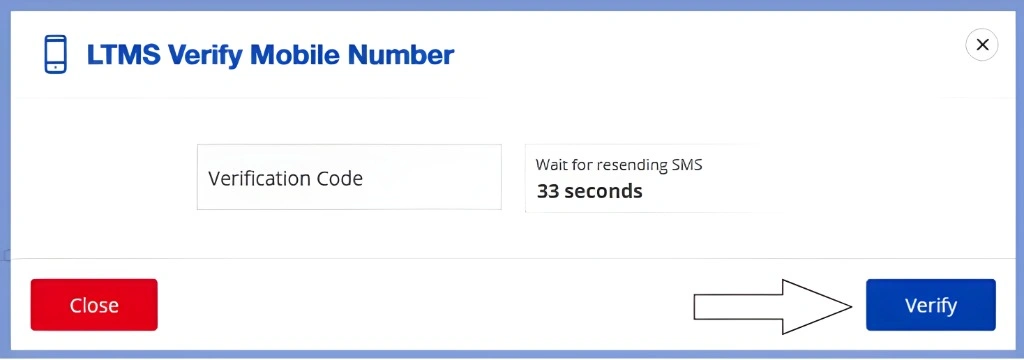
Second, make sure your phone can receive normal SMS messages and that your signal is stable. Weak reception, carrier delays, or blocked business messages can stop a code from arriving. Also check that airplane mode, message filters, or blocked SMS settings are not getting in the way.
Third, confirm that you are verifying the correct number. If you recently changed SIM cards, changed your mobile number, or no longer use the number attached to your LTMS account, stop retrying and move to account correction instead. LTO’s official support materials show that mobile or phone number correction is handled through Client Care.
When the Problem Is Your LTMS Account
Sometimes the issue is not your phone at all. It can be an account mismatch, an old number saved in your profile, or an account that needs manual verification before new details can be used. LTO’s support coverage includes personal LTMS portal account access concerns, account verification, and correction of email or phone information, which strongly suggests these account-side issues are part of the normal support flow.
This is the point where many users waste time resending codes over and over. If the same number keeps failing after basic checks, treat it as an account issue, not just a delayed text message.
The Fastest Official Fix
The official route is LTO Client Care. The LTMS Contact Us page is built for this kind of request and asks for your name or client ID, email, phone details, topic, and concern. That makes it the right place to report a failed phone verification issue, especially when the number on file needs to be corrected.
If your case involves changing or retrieving LTMS account details, LTO’s published FOI responses repeatedly direct users away from public disclosure and toward Client Care instead. In other words, do not expect a public request to solve a private account verification problem.
What to Prepare Before Contacting LTO
Prepare these before sending your request so you do not lose time:
A Simple Message You Can Send
Subject: LTMS Phone Verification Problem
Good day.
My LTMS phone verification is not working, and I am not receiving the verification code on my mobile number.
My full name is [Your Full Name].
My active email address is [Your Email Address].
Please help me verify or update the mobile number linked to my LTMS account.
Attached are my valid ID, signed consent letter dated today, and my current photo while holding the same ID.
Thank you.
This matches the type of request LTO already handles through Client Care for account verification and contact detail correction.
Common Mistakes That Make It Worse
One common mistake is resending codes too many times in a row. A newer code can replace an older one, which makes the earlier message useless.
Another mistake is trying to fix a wrong phone number with repeated OTP requests. If the wrong number is stored in LTMS, no amount of retrying will solve it. That is already a Client Care case.
A third mistake is using the FOI route for private account access problems. LTO’s responses show that personal account details are not released that way and that Client Care is the correct path.
FAQs
Conclusion
If your LTMS phone verification is not working, start with the simple checks first: wait for one fresh code, confirm your signal, and make sure you are using the right number. But if your number changed, your account details are wrong, or the same problem keeps happening, move quickly to LTO Client Care. That is the official path LTO uses for account verification and phone number correction, and it is usually the most direct fix.


