
With more Filipinos using the LTMS Portal and eGovPH app to renew licenses and pay vehicle fees, scammers are creating fake websites that look official. These sites often ask for personal information or payments, and many drivers fall victim each year.

In this guide, you’ll learn how to spot fake LTMS sites, protect yourself, and ensure your online transactions are safe in 2026.
LTO Portal Scam Warning: Fake LTMS Sites in 2026

Scammers create websites that look like the official LTO LTMS Portal. They may:

  • Copy the logo, colors, and layout of the official site
  • Ask you to enter Client ID, email, or password
  • Request payment for registration or renewal services
  • Send emails or messages claiming your account is blocked

These sites are not linked to the official LTO system, so your information can be stolen, or your payments may be lost.

You can also read: LTMS Medical Certificate Not Showing: How to Fix It in 2026

How to Identify a Fake LTMS Website
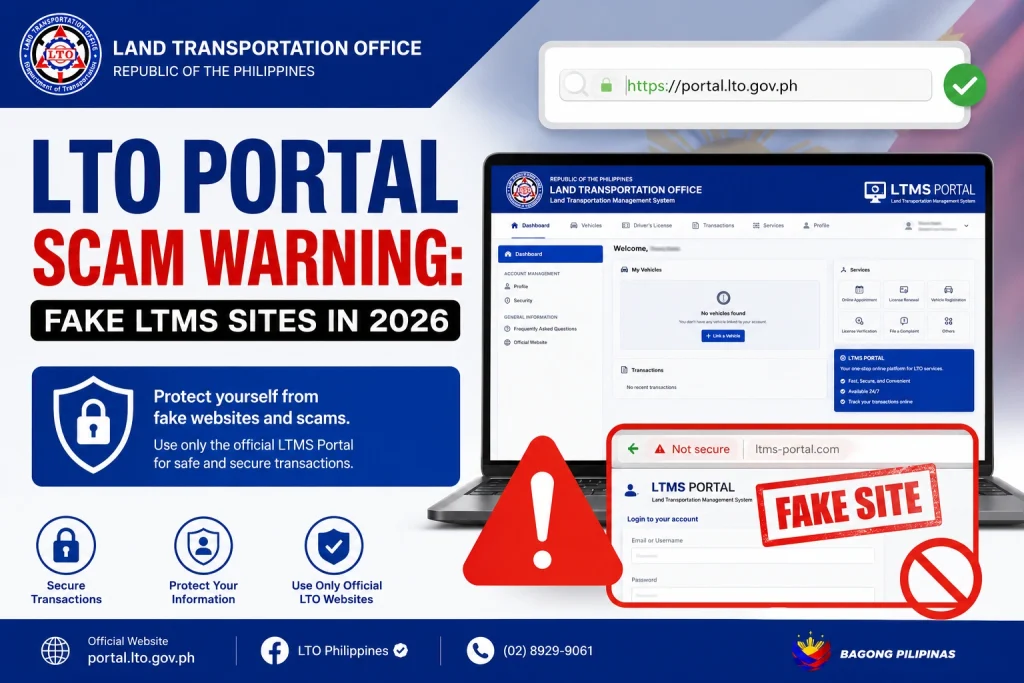
Check the URL carefully – The official site is always portal.lto.gov.ph. Any variation or misspelling is suspicious.

No HTTPS or secure lock symbol – Official sites have SSL security. Fake sites may not.

Requests for unusual payments – LTO does not ask for third-party payment outside the official system.

Emails from unofficial addresses – Legitimate LTO emails come from official government domains.

Poor website design or broken links – Scam sites often have errors, typos, or missing pages.

Tip: Bookmark the official LTMS Portal to avoid accidentally visiting a fake site.

  • LTMS Portal: portal.lto.gov.ph
  • eGovPH App: Download from the Google Play Store or Apple App Store
  • Official LTO announcements: Check LTO’s verified social media pages or government news sites

Always use these official channels for login, registration, and payments.

  • Never enter personal info on suspicious sites
  • Do not pay through unverified third parties
  • Verify website URLs before logging in
  • Enable two-factor authentication on your accounts when possible
  • Report scam sites to LTO immediately

By following these steps, you can keep your Client ID, license info, and payment details safe.

  • Change your password immediately in LTMS and eGovPH
  • Monitor your email and accounts for suspicious activity
  • Report the incident to LTO via official support channels
  • Avoid making further payments until you verify the official website

Taking quick action can reduce the risk of fraud or identity theft.

As more drivers use online platforms, scam attempts are increasing. Being cautious ensures you:

  • Complete license and vehicle renewal safely
  • Avoid losing money to fake websites
  • Protect your identity and account information

Awareness and verification are key to using LTMS and eGovPH safely.

Check that the URL is portal.lto.gov.ph and that it has a secure HTTPS connection.

No. Payments must be made through official channels in LTMS or eGovPH.

Change your LTMS and eGovPH passwords immediately and monitor for suspicious activity.

Contact LTO through official support channels or social media pages to report the scam.

Be cautious. Only emails from official government domains are valid; do not click links or pay until verified.

Conclusion

Scammers are targeting LTMS users in 2026, but you can protect yourself by using only official sites, verifying URLs, and avoiding third-party payments.
Always double-check the website or app before entering personal information, and report suspicious activity. Staying vigilant ensures a safe, smooth online renewal process for your driver’s license and vehicle registration.

Similar Posts

Leave a Reply

Your email address will not be published. Required fields are marked *