
LTMS Payment Failed but Money Was Deducted — What to Do
It can be frustrating when you try to make a payment on the Land Transportation Management System LTMS portal, only for the payment to fail, but the money is still deducted from your account. Whether it’s for your license renewal, vehicle registration, or traffic fines, a failed payment can leave you wondering how to proceed.
In this article, we’ll explain why this happens, how to resolve the issue, and the steps you can take to ensure your payment is correctly processed.

Common Reasons for LTMS Payment Failures
Before jumping into the solution, it’s important to understand why a payment might fail, even if the money is deducted:
Connection or Server Issues
The LTMS portal might experience server delays or internet connection problems, which can cause payment confirmation to fail while the transaction is processed.
Payment Gateway Problems
Sometimes, the payment gateway used by LTMS (like credit card processors, bank payments, or third-party payment providers) might have an issue, causing the payment to fail even though the money was deducted from your account.
Incorrect Payment Information
If you’ve entered the wrong details (like card number, expiration date, or bank account info), the payment might be deducted but not processed properly.
Transaction Timeout
Payment processing times can sometimes exceed the time limit, resulting in a payment timeout. However, your bank or payment provider may have already deducted the amount from your account.
You can also read: Why the LTMS Portal Is Slow or Down Today — Causes and Fixes
What to Do When LTMS Payment Fails But Money Was Deducted
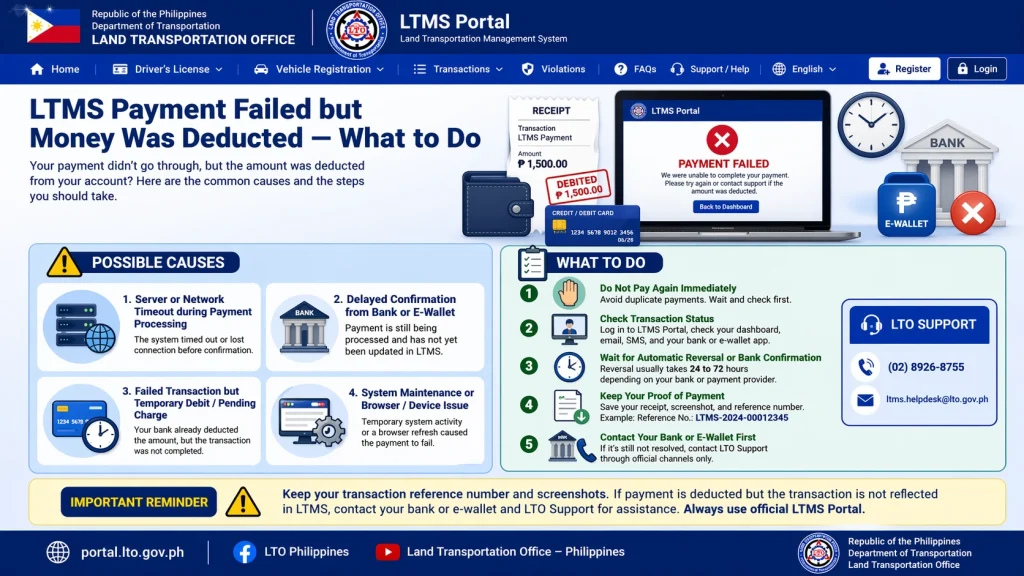
Wait for the Payment to Reflect in LTMS
Sometimes the payment deduction happens successfully, but the LTMS system takes a few minutes to update and reflect the payment. If your payment fails but the money has been deducted from your bank account:
Check Your Bank Statement
Verify that the money has indeed been deducted from your bank account:
Contact LTMS Support
If the payment doesn’t reflect after waiting, or if you see the payment was deducted but you still can’t complete your transaction, it’s time to contact LTO customer support.
To resolve the issue, you can:
Make sure to provide the following information to expedite the process:
Follow Up on the Issue
After reporting the issue, LTO will typically review your case and update your payment status. If the payment was successfully deducted but not processed, LTO will manually adjust your records.
Request a Refund or Reversal (if Necessary)
If the payment was deducted from your account but it wasn’t processed or reflected on LTMS, and the issue cannot be resolved within a reasonable time:
Additional Tips to Avoid Payment Failures in LTMS
To reduce the likelihood of payment issues in the future, follow these tips:
Double-check your payment details
Always ensure that your card details, bank account info, and payment method are correct before confirming the transaction.
Use a stable internet connection
A slow or unstable internet connection can cause timeouts or interruptions during the payment process.
Complete payments during off-peak hours
Try to make payments early in the morning or late at night to avoid server congestion.
Keep a screenshot
of your payment confirmation for your records.
FAQs
Conclusion
If your LTMS payment fails but the money has been deducted from your account, don’t panic. Follow the steps in this guide to verify the payment, contact LTO support, and resolve the issue quickly.
With a little patience and the right steps, your transaction will be corrected, and you can continue using LTMS services without further problems.


