
Why LTMS Says Your Account Already Exists — How to Fix It
If you’re trying to register on the Land Transportation Management System LTMS portal and encounter the message “Your account already exists”, don’t worry — you’re not alone. This common issue often arises when users try to create a new account but the system already has their details stored.
In this article, we’ll break down why LTMS might say your account already exists and provide simple solutions to fix the problem.
What Does “Your Account Already Exists” Mean?
When LTMS tells you that your account already exists, it means the system has already registered your LTO client number or email address from a previous registration. This could happen if you:
You can also read: LTMS Payment Failed but Money Was Deducted — What to Do
Common Causes of the “Account Already Exists” Error
Multiple Accounts with the Same LTO Client Number
You may have accidentally created multiple accounts on the LTMS portal with the same LTO client number but different email addresses or contact details. The system will recognize this as a duplicate account and show the error.
Registration via a Car Dealer
Sometimes, car dealers create accounts for you when you buy a vehicle or renew your driver’s license. If you don’t remember this, trying to create a new account can result in the error message.
Incorrect Details During Registration
If the details you entered during registration, such as your email address or phone number, were slightly different from what the system already has, the LTMS portal may think you’re creating a new account.
How to Fix the “Your Account Already Exists” Error
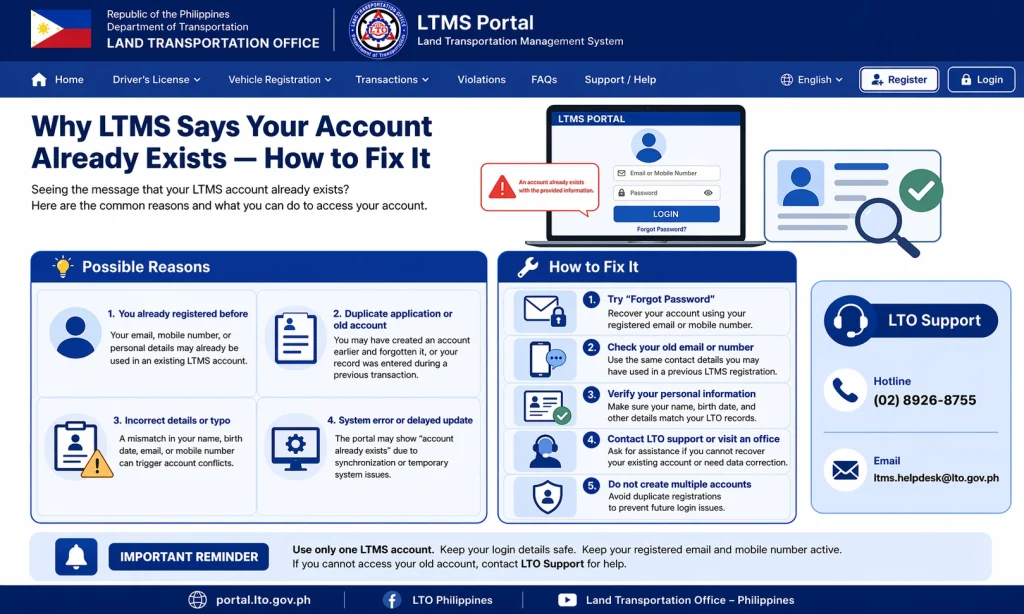
The first step to fixing this issue is to try resetting your password. If you forgot your account details or don’t remember creating an account, resetting your password will allow you to log into your existing account.
Steps to Reset Your Password:
Once you reset the password, log in to your account and check your details.
Go to the LTMS login page and click Forgot Password.
Enter your registered email address or LTO client number.
Follow the instructions sent to your email to reset your password.
If resetting your password doesn’t work, contact LTO customer service for assistance. They can help you identify the account associated with your LTO client number and assist with recovering or merging duplicate accounts.
To contact LTO, visit the LTMS portal and look for the Contact Us section. Alternatively, you can call or email LTO for support.
Ensure that the email address and phone number you’re using to register are correct. If you registered with a different email address in the past, try using that email to reset your password or recover your account.
If you have multiple LTMS accounts, LTO support may be able to merge them into a single account. This way, you won’t face issues with duplicate records in the future. Be prepared to provide your account details and proof of identity to facilitate the merge.
Tips to Avoid “Account Already Exists” Errors in the Future
Use the Same Email Address
When registering or updating your LTMS account, always use the same email address you’ve used previously to avoid duplicate accounts.
Keep Your Login Details Safe
Use a password manager to securely store your LTMS login information and avoid forgetting it.
Check Your LTO Client Number: Ensure that your LTO client number is correct and consistent across all your records and registrations.
FAQs
Conclusion
The “Your account already exists” error on LTMS can be frustrating, but it’s usually easy to fix. Whether you’ve forgotten your password, used a different email, or are trying to register again, following the steps outlined above should help you resolve the issue quickly.
If you continue to experience problems, don’t hesitate to reach out to LTO customer support. They are there to help you regain access to your account and ensure a smooth registration process.


