
Fix LTMS Portal Login Problems in Less Than 5 Steps (2026)
The LTMS Portal is an essential platform for managing your driver’s license, vehicle registration, and other LTO-related services. If you’re having trouble logging in, don’t worry. Most login issues can be fixed quickly. In this guide, we’ll show you how to solve LTMS Portal login problems in 5 simple steps.
Step by Step Fix LTMS Portal Login Problems
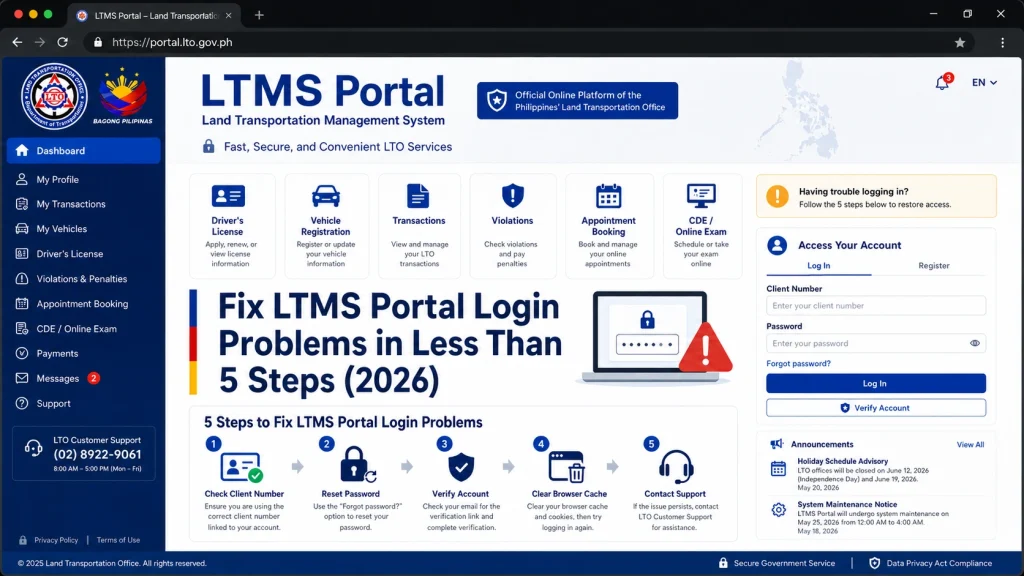
- One of the most common causes of login issues is incorrect login credentials.
- How to fix it:
- Double-check your email address and password. Ensure you are using the correct email address (the one you registered with) and the right password.
- Look for typos: Pay attention to capital letters and special characters.
- If you’re unsure about your email address, try to remember or verify it through your email inbox for any LTMS-related notifications.
- If you can’t remember your password or it’s not working, you can easily reset it through the LTMS Portal.
- How to fix it:
- Go to the LTMS Portal login page.
- Click on the “Forgot Password?” link below the login fields.
- Enter your email address (the one you registered with).
- Check your email inbox (and spam folder) for the password reset link.
- Follow the instructions to create a new password.
- Tip: Make sure your new password is strong and contains a mix of letters, numbers, and special characters.
- If you’ve entered the correct login credentials but still can’t log in, it might be due to cached data stored in your browser. This can cause issues with loading the latest version of the portal.
- How to fix it:
- Clear your browser’s cache and cookies.
- After clearing, close and reopen your browser, then try logging in again.
- Alternatively, try logging in using Incognito Mode (private browsing) to avoid issues caused by stored data.
- Sometimes, browser compatibility issues can prevent you from accessing the LTMS Portal.
- How to fix it:
- Try a different browser: If you’re using Chrome, try Firefox or Safari instead.
- Switch devices: If the portal still won’t load, try using a different device (phone, tablet, or computer).
- Tip: Ensure your browser is up-to-date to avoid compatibility issues with the portal.
- If you’ve followed the above steps and are still unable to log in, there may be scheduled system maintenance or server issues on the LTMS Portal.
- How to fix it:
- Check LTMS or LTO social media pages or the official website for any announcements about scheduled maintenance or system updates.
- Wait for a while: If the portal is temporarily down for maintenance, try logging in again after some time.
You can also read: LTMS Registration: Why Your Details Aren’t Showing Up (2026)
FAQs
Conclusion
Most LTMS Portal login problems can be solved quickly by following these 5 simple steps. If you’ve checked your credentials, reset your password, cleared your cache, and tried a different browser, you’ll likely be able to log in without any issues.
If the problem persists, check for system updates or contact LTO customer support for further assistance.


