
LTMS Portal: How to Change Registered Email Update (2026)
LTMS Portal users often need to change their registered email because they lost access to an old inbox, changed phone numbers, used a dealer’s email by mistake, or created an account with the wrong address. Your registered email is important because it is often tied to login, password recovery, account verification, and official LTO notifications.
If your email is outdated or inaccessible, updating it correctly can help protect your account and prevent future login problems. The key is to use official LTMS or LTO support channels and avoid risky shortcuts.
Why You May Need to Change Your LTMS Email
There are many real reasons users update their LTMS email:
Using your own active personal email is usually the safest option for long-term account control.
You can also read: What Causes LTMS Portal Crashes and How to Fix Them (2026)
Can You Change Your LTMS Registered Email Online?
In many cases, account-related profile management may start inside your LTMS account dashboard if you still have access. However, some users report that major account ownership issues or inaccessible old email problems may require official LTO Client Care or branch assistance.
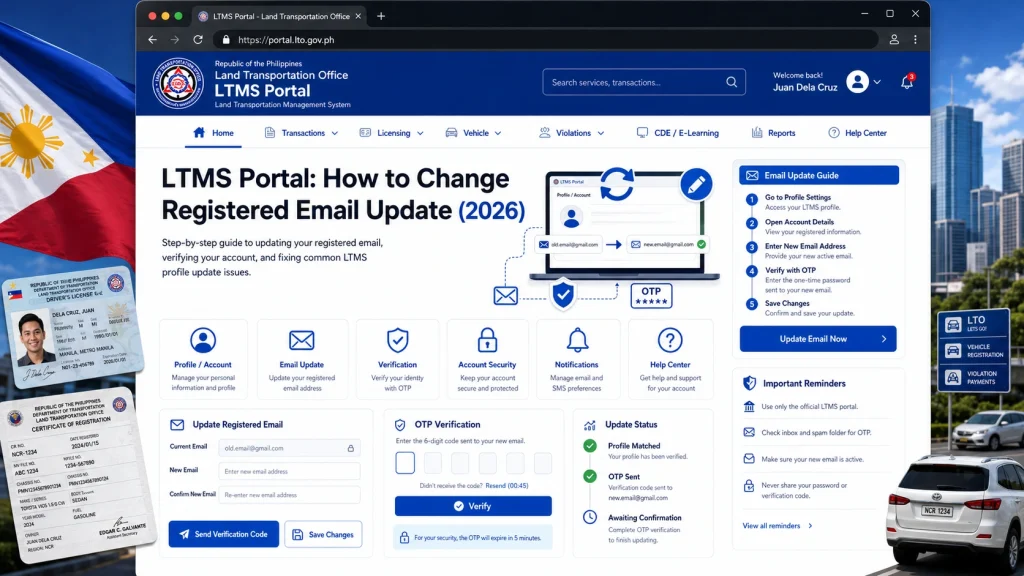
Your available option often depends on one key question: Can you still log in?
If You Can Still Access Your LTMS Account
If you can log in normally, start by checking your profile or account settings.
Log In to the Official LTMS Portal
Use only the official LTMS Portal. Avoid third-party links.
Open Profile or Account Information
Look for personal details or account settings where contact information may be managed.
Check Email Update Options
If editable, carefully update your new email and verify it immediately.
Confirm Verification
Watch for a confirmation or verification message. Save screenshots for safety.
If You Cannot Access Your Old Email
This is one of the most common LTMS problems. If password reset links or verification codes go to an old inbox, self-service recovery may be limited.
Check if you used:
Dealer-created email
Personal email
Work email
School email
Sometimes password reset attempts can reveal whether your account still recognizes your old address.
If your old email is inaccessible, official support may need to verify identity before major changes.
Prepare:
Screenshot of issue
Full legal name
Driver’s license number if applicable
LTMS Client Number
Valid government ID
What If a Dealer or Agent Registered Your LTMS Account
This is a major concern for many users. If a dealership, driving school, or third party created your LTMS account, your email access may not fully belong to you.
In this case:
Keeping personal control of your LTMS account is important for future renewals and records.
Common Problems When Changing LTMS Email
Verification Link Not Arriving
Check spam, junk, and email spelling first.
Duplicate Account Risk
Do not create a second LTMS account just because your email is inaccessible.
Old Email Still Required
Some security systems may require identity verification before major account changes.
Profile Errors
Mismatched personal information can slow correction.
Best Safety Tips Before Updating Email
Protect yourself with these habits:
These steps can prevent bigger recovery issues later.
What Not to Do
Avoid these risky mistakes:
These actions can create security risks or record conflicts.
Quick LTMS Email Change Checklist
| Situation | Best First Step |
|---|---|
| Can log in normally | Check profile settings |
| Forgot password | Use official reset |
| Lost old email access | Contact LTO Client Care |
| Dealer controls account | Request ownership recovery |
| Verification not arriving | Check spam or resend |
| Wrong email typo | Correct through official support |
FAQs
Conclusion
Changing your LTMS Portal registered email is important for account security, password recovery, and long-term control of your driver or vehicle records. The safest path depends on whether you still have account access, but official LTMS tools and LTO support are usually the best options.
Act early if your email is outdated, incorrect, or controlled by someone else. A secure personal email can help protect your LTMS account, reduce future recovery problems, and make your LTO transactions smoother.


