
How to Recover Your LTMS Account Without Branch Visit (2026)
If you’re having trouble accessing your LTMS Portal account, you might not have to visit an LTO branch in person. There are several ways to recover your account online, saving you time and effort. In this guide, we’ll walk you through the steps to recover your LTMS account without leaving your home.
Common LTMS Account Access Issues
Before jumping into the recovery process, let’s review some common issues that may prevent you from accessing your LTMS account:
Forgotten Password
This is a common issue where users forget the password they set during registration.
Incorrect Login Credentials
You might be entering the wrong email address, LTO Client Number, or have mistyped any of the details.
Account Lock
After multiple failed login attempts, your account might get locked temporarily for security reasons.
Account Suspension
Accounts may be suspended if there’s any unusual activity, violation, or incomplete registration process.
You can also read: LTMS Portal: Fix Data Mismatch Issues Fast Update (2026)
Step-by-Step: How to Recover Your LTMS Account Online
Reset Your Password
The most common reason for account access issues is forgetting your password. Here’s how to reset it:
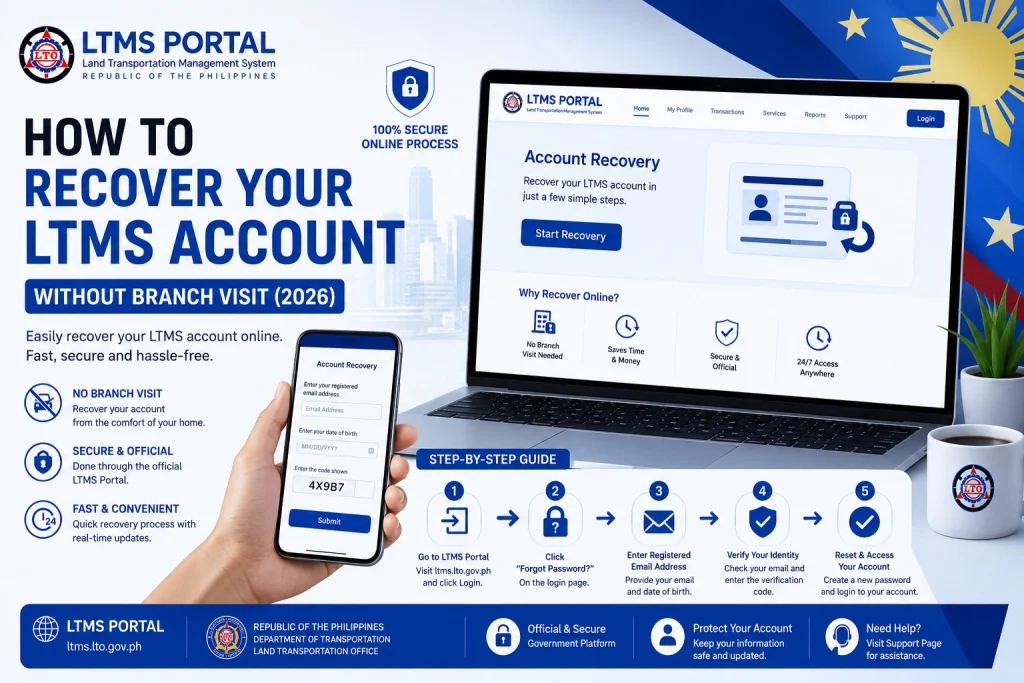
Go to the LTMS Portal Login Page
Visit the LTMS Portal’s login page where you usually sign in.
Click on “Forgot Password?”
Below the login fields, you’ll see a link that says “Forgot Password?”. Click on this to begin the recovery process.
Enter Your Registered Email Address or LTO Client Number
Enter the email address or LTO Client Number you used during registration.
Check Your Email
LTMS will send a password reset link to your email. Make sure to check your spam/junk folder if you don’t see the email in your inbox.
Follow the Instructions
Click the link in the email to create a new password. Make sure your new password is strong (use a combination of upper/lowercase letters, numbers, and special characters).
Log In with Your New Password
After resetting your password, go back to the LTMS Portal login page and log in with your new password.
Recover Your Account Using Your Email or LTO Client Number
If you’re unsure which email or LTO Client Number you used, follow these steps:
Visit the LTMS Portal
Go to the LTMS login page.
Click on “Forgot Email or Username?” (if available)
Some LTMS portals provide an option to recover your username or email address.
Enter Your Personal Information
You may be asked for your full name, date of birth, and other personal details. This helps the system locate your account.
Check Your Email
If the system finds your account, it will send your registered email address to the email inbox you provide.
Access Your Account
Once you receive your email, you can use the provided email address to log in and reset your password if needed.
Account Lock or Suspension Recovery
If your account is locked due to multiple failed login attempts or other security reasons, follow these steps:
Most of the time, LTMS will automatically unlock your account after 24 hours if it was locked due to multiple incorrect login attempts.
Once the lock is lifted, you can reset your password using the steps mentioned earlier.
If your account has been suspended, you’ll need to contact LTO support for assistance. They can help you understand the cause of the suspension and guide you through the process of recovering your account.
Visit the official LTO website for contact details or submit a support ticket if available.
Using the LTMS Portal Support or Helpdesk
If none of the above steps work, or if you’re still facing issues logging in, you may need to contact LTMS support directly:
Visit the LTMS Support Page
Go to the Help or Support section of the LTMS Portal.
Submit a Support Ticket
Fill out the support form with your account details, such as your email, LTO Client Number, and vehicle registration number (if applicable).
Wait for LTO’s Response
LTO customer service will assist you in recovering your account. They may ask you to provide additional information for verification purposes.
Additional Tips for LTMS Account Recovery
When to Visit an LTO Branch
While it’s possible to recover your LTMS account online in most cases, there may be situations where visiting an LTO branch is necessary:
FAQs
Conclusion
Recovering your LTMS account without visiting an LTO branch is possible in most cases. By following the steps above, you can reset your password, recover your username, or resolve an account lock/suspension issue. If the issue persists, reaching out to LTO support will help you get the assistance you need.
Don’t let login problems slow you down — most of the time, recovery can be done in a few simple steps!


