
How to Unlock a Locked LTMS Account Quickly (Guide 2026)
If you tried to log in to your LTMS portal account LTO Portal and now it is locked, do not worry. Many drivers face this because of repeated wrong passwords, email mix-ups, or missed verification steps. In this guide, I will walk you through the easiest ways to unlock it and get back online fast.
What Locked Means
When the LTMS portal says your account is locked, it usually means the system blocked access after multiple incorrect login attempts or security reasons. This is meant to protect your data but it can be frustrating when you just want to log in.
You can also read: LTMS vs LTO Branch: What Can Be Done Online in 2026
Quick First Steps to Try Before Anything Else
Take a Breath and Do Not Panic
Before trying anything complex, simply close your browser, wait a few minutes, then try again. Sometimes the system temporarily locks access for a short period.
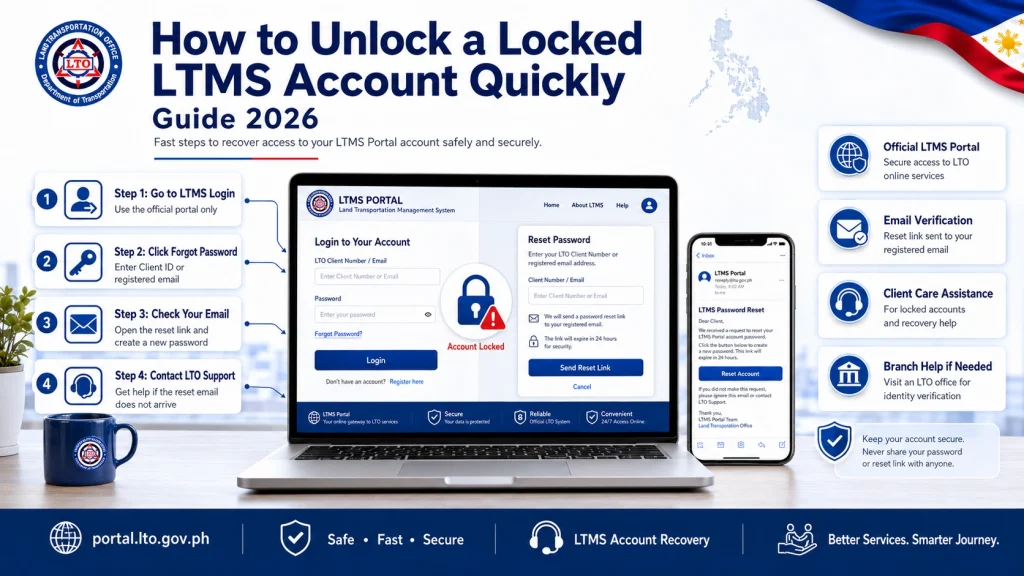
Use Forgot Password
If you see a Forgot Password option, click it:
Tip: Also check your Spam or Promotions folders as sometimes emails land there.
When the Portal Still Won’t Let You In
If the system still will not unlock your account even after trying the steps above, here is what you can do:
Email LTO Client Care
Contact them directly and politely request an account unlock or password reset. In your email, include:
This helps LTO verify your identity and fix your account from their side.
Tip: Write your email clearly and kindly. LTO support deals with many requests, so politeness helps.
Visit Your Nearest LTO Office
Some users find email support slow or not responsive. In that case:
Staff can manually reset your account credentials or help you create new ones. This often works faster than email.
How to Prevent Future Lockouts
Double-Check Your Email Before Registering
Make sure it is spelled correctly to receive verification emails.
Write Down Your Password Somewhere Safe
So you do not have to guess later and avoid repeated failed logins.
Avoid Fake Login Links
Always use the official LTMS portal link. Scammers may send fake links in messages.
Understanding LTMS Security Measures
LTMS may lock accounts for:
Knowing why the system locks accounts helps you avoid triggering it again.
Tips for Fast Resolution
This makes LTO support faster and more effective.
FAQs
Conclusion
Getting locked out of your LTMS portal account is frustrating but it is fixable. Start with the online reset, then move to email support, and if needed, visit the nearest LTO office. Keep your login details safe, watch for fake links, and follow these tips. You will be back in your account quickly.


