
How to Avoid LTMS Portal Fake Sites & Phishing Update 2026
The LTMS Portal is a convenient online tool for managing your driver’s license, vehicle registration, and other LTO-related services. However, like any online platform, it can be a target for scammers looking to steal personal information. Fake LTMS websites and phishing attempts are common tactics used by fraudsters. In this guide, we’ll explain how to protect yourself from fake LTMS sites and phishing attacks, ensuring that your information stays safe.
What is Phishing?
Phishing is a type of scam where fraudsters impersonate legitimate organizations, like the LTO or LTMS Portal, to trick you into sharing sensitive personal information. They might send fake emails, text messages, or create fake websites that look almost identical to the real LTMS Portal.
Phishing can lead to:
Understanding how to spot these scams is essential to keep your information secure.
You can also read: How to Change LTMS Portal Email and Update Info (2026)
Common LTMS Portal Phishing Scams
Fake LTMS Websites
Scammers may create websites that look almost identical to the official LTMS Portal to trick you into entering your personal information, like email addresses, passwords, credit card details, or driver’s license numbers.
Phishing Emails and SMS
Fraudsters may send fake emails or text messages that appear to be from the LTMS Portal or LTO. These messages often contain urgent requests for you to verify your account, update your details, or pay a fee.
These emails typically contain links to fake websites that ask you to log in and provide sensitive information.
Social Media Scams
Scammers sometimes use fake social media accounts to offer services related to the LTMS Portal, such as fast-tracking license renewals or vehicle registrations for a fee. These accounts might even look official but are designed to steal personal information.
How to Avoid Fake LTMS Sites and Phishing
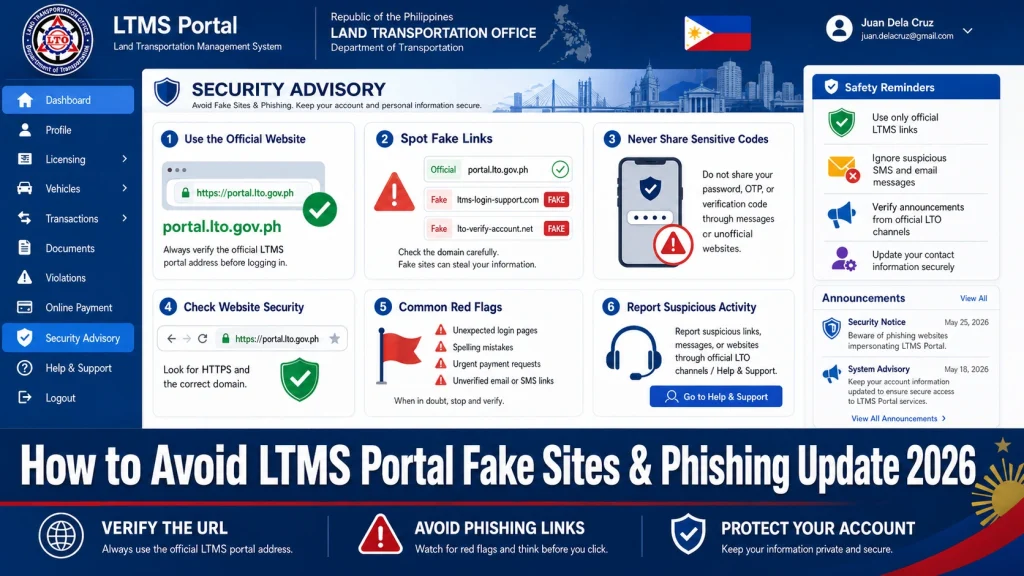
Always ensure that you’re on the official LTMS Portal website. Fake websites often use URLs that are similar but not exact, such as ltms-portal.com or lto-portal.ph.
How to verify the correct URL:
- The official LTMS Portal website is: portal.lto.gov.ph
- Check the padlock icon: Legitimate websites use HTTPS and display a padlock symbol in the address bar to indicate that the site is secure.
- Look for the official LTO domain: Official emails and websites will use domains like @lto.gov.ph and @portal.lto.gov.ph.
Tip: Always type the website address directly into your browser, rather than clicking on links from emails or messages.
text messages often create a sense of urgency, asking you to verify your account or make a payment immediately. These messages might look official but contain links to fake sites.
How to avoid phishing emails and SMS:
- Do not click on links: If you receive an email or message asking you to log in to the LTMS Portal, do not click on any links. Instead, type portal.lto.gov.ph directly into your browser.
- Check the sender’s email address: Official LTMS emails will come from addresses like @lto.gov.ph. Be cautious of emails from unknown senders or strange domains.
- Look for signs of phishing: Phishing emails often contain spelling errors, generic greetings like “Dear user,” or suspicious attachments. If you notice any of these signs, it’s likely a scam.
Tip: If you’re ever unsure, contact LTO directly using their official contact methods to confirm the legitimacy of the email or message.
Scammers may create fake social media accounts claiming to offer LTMS-related services. To avoid falling victim to these scams, always rely on official LTO social media accounts for any updates or inquiries.
How to avoid social media scams:
Don’t engage with suspicious accounts: Avoid interacting with accounts that offer services like fast-tracking applications or paying fines for a fee.
Follow official LTO accounts: Always check that you are following LTO’s official accounts on platforms like Facebook, Twitter, and Instagram. These accounts will have the verified blue checkmark.
If the LTMS Portal offers two-factor authentication (2FA), enabling it is an excellent way to add an extra layer of security to your account. With 2FA, even if someone steals your password, they would still need the second verification code to access your account.
How to enable 2FA:
Enable two-factor authentication (usually through an authentication app or email).
Go to the security settings of your LTMS account.
A strong password is your first line of defense against unauthorized access. Always use a unique, strong password for your LTMS Portal account.
How to create a strong password:
- Use a mix of uppercase, lowercase, numbers, and special characters.
- Avoid using easily guessable passwords like your name or birthdate.
- Don’t reuse passwords across multiple sites. Consider using a password manager to store your passwords securely.
If you receive suspicious emails, messages, or come across fake LTMS websites, report them immediately to LTO or the platform administrators.
How to report suspicious activity:
Flag fake social media accounts by reporting them to the platform (e.g., Facebook or Instagram).
Report phishing emails or websites to LTO customer support via email or the contact form on their official site.
FAQs
Conclusion
Fake LTMS websites and phishing scams are unfortunately common, but by following these tips, you can protect yourself and your personal information. Always verify the authenticity of any communication or website before entering sensitive data.
By staying vigilant and using best practices for online security, you can safely use the LTMS Portal without falling victim to scams.


