
Can I Cancel My LTMS Portal Appointment? Here’s How (2026)
Can I cancel my LTMS Portal appointment? Yes, in most cases, LTMS users can cancel or reschedule appointments through their account before the scheduled visit by going to the Appointments or Active Transactions section and managing the booking. LTMS appointment management is designed to help users change plans, avoid missed schedules, and free up slots when necessary.
This is helpful if your schedule changes, you selected the wrong branch, entered incorrect details, or need a different date. Acting early is usually the safest option.
How to Cancel Your LTMS Appointment Step by Step
Canceling an LTMS appointment is usually done inside your LTMS account dashboard.
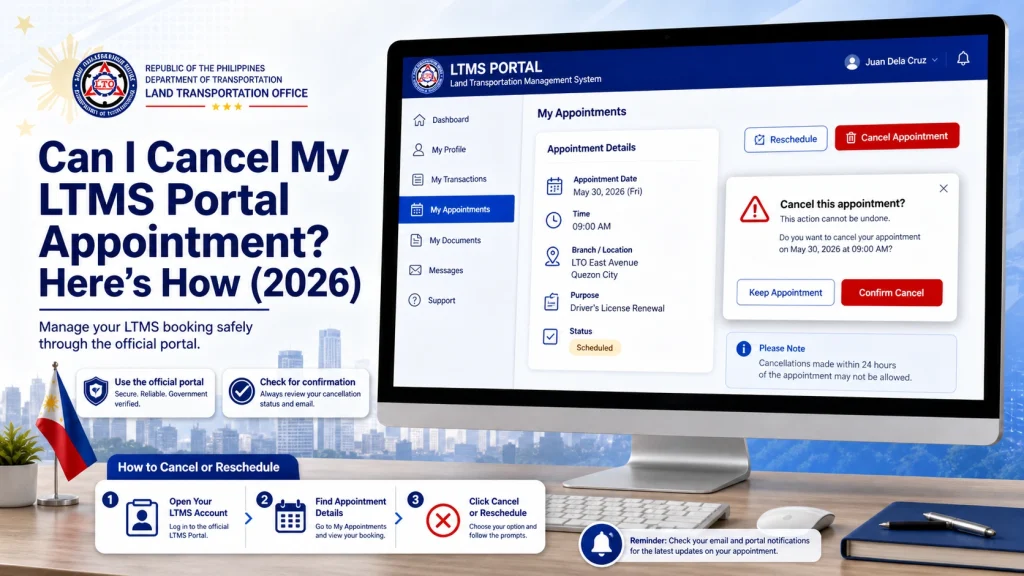
Log In to the Official LTMS Portal
Go to the official LTMS Portal and sign in using your registered credentials. Always use the official LTO portal only.
Open the Appointments or Active Transactions Section
Find your current appointment record. This section may show your scheduled date, branch, and transaction type.
Select Your Existing Booking
Click the appointment you want to change.
Choose Cancel or Reschedule
If cancellation is available, confirm your choice. If you still need the transaction later, rescheduling may be the better option.
Save Confirmation
Take a screenshot or save confirmation details for your records. This can help if system errors happen later.
Can You Reschedule Instead of Canceling?
Yes, many LTMS users may reschedule instead of fully canceling if slots are available. Rescheduling can be useful if:
Availability depends on branch schedules and open slots. Busy branches may fill quickly.
You can also read: LTMS Portal Phishing: How to Spot Fake Sites Update (2026)
What Happens If You Miss Your LTMS Appointment?
Will You Pay Again If You Cancel?
This can depend on your transaction type and payment stage. Some users have reported confusion about canceled transactions and reprocessing costs, especially if a payment or incorrect application was already submitted.
Before canceling, check whether:
If unsure, contact official LTO Client Care before making major account changes.
Common Reasons People Cancel LTMS Appointments
Many users cancel because of:
Canceling early can reduce confusion and may help keep your account cleaner.
What If the Cancel Button Is Missing?
If you cannot find cancellation options:
Sometimes portal layout, browser issues, or transaction type may affect visible options.
Important Safety Tips
Avoid fixers or third parties claiming they can “manually cancel” your appointment faster. LTMS appointment management should be handled through official channels whenever possible.
Protect your:
Best Practice Before Canceling
Before canceling, ask yourself:
Do I still need this transaction soon?
If yes, rescheduling may be smarter.
Did I make a profile or application mistake?
Some errors may need correction instead of cancellation.
Is my preferred branch full?
Canceling too quickly may cost you a valuable slot.
Quick LTMS Appointment Fix Checklist
| Problem | Best Action |
|---|---|
| Wrong date | Reschedule |
| Wrong branch | Reschedule or cancel |
| Can’t attend | Cancel early |
| Wrong details | Check correction options |
| Missed schedule | Rebook |
| Cancel option missing | Contact support |
FAQs
Conclusion
Yes, LTMS Portal appointments can often be canceled or rescheduled, which makes it easier to adjust plans when mistakes or schedule conflicts happen. The safest method is to manage your booking directly through the official LTMS account dashboard and save proof of any changes.
Cancel carefully, review your transaction details, and avoid rushed decisions if your slot is valuable. A smart cancellation or reschedule can save time, reduce account confusion, and help keep your LTO process smoother.


