
Track Your Driving Exam Certificate Online Update 2026
Need to check if your driving exam certificate is already recorded online?
In the Philippines, most driving-related certificates are checked through the LTMS Portal, the official online system of the Land Transportation Office. This may include your TDC, PDC, or CDE certificate, depending on what you applied for.
What is Driving Exam Certificate
To track your driving exam certificate online, log in to the official LTMS Portal, then check the Certificates, Documents, Transactions, or E-Learning sections. For CDE, use the CDE Online Validation Exam page. For TDC or PDC, ask your driving school if they already uploaded or transmitted your certificate to LTMS. The official LTMS portal includes CDE exam, driver’s license renewal course, login, and registration options.
You can also read: How to Check Your CDE Exam in LTMS Portal Update 2026
What Certificate Are You Tracking?
Before checking, know which certificate you need.
TDC Certificate
The Theoretical Driving Course certificate is usually needed when applying for a student permit. Some accredited schools say they electronically transmit the TDC Certificate of Completion to LTO-LTMS after the student passes.
PDC Certificate
The Practical Driving Course certificate is usually needed for a non-professional driver’s license application.
CDE Certificate
The Comprehensive Driver’s Education certificate is used for driver’s license renewal. The official LTMS CDE page says the CDE Online Validation Exam is for driver’s license renewal, and a passing score creates a certificate.
How to Track Your Certificate in LTMS
Track Your Driving Exam Certificate in LTMS Step by Step:
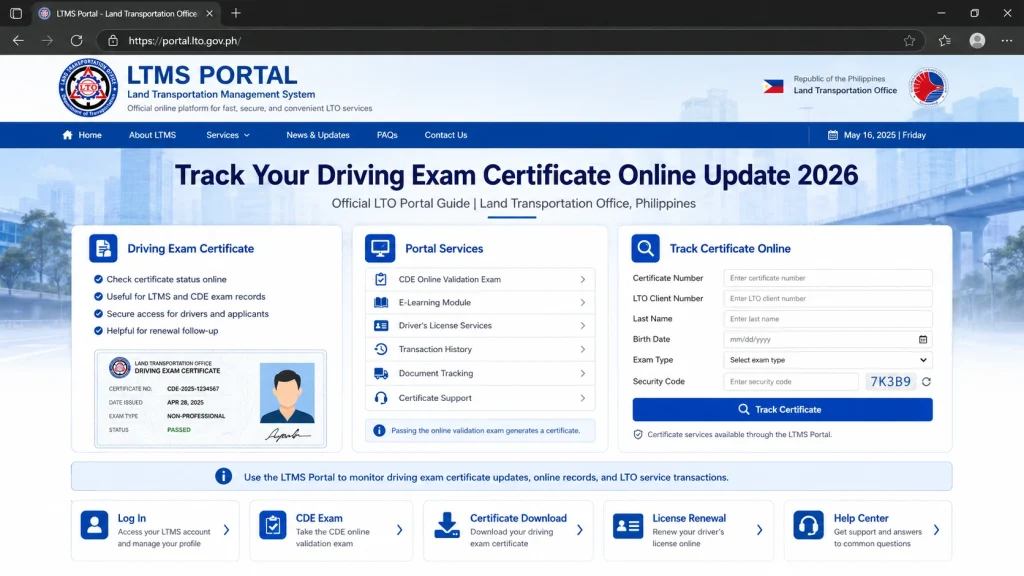
- Visit the official LTMS Portal and log in to your account.
- Use only the official LTO portal. Avoid fake websites asking for your password or personal details.
- After logging in, check your account dashboard.
- Look for sections like:
- Certificates
- Documents
- Transactions
- E-Learning
- Licensing
- Your certificate may not always appear on the homepage, so check each related section.
- Open Documents and look for any driving course or exam certificate.
- If your certificate is already uploaded, it may appear as a downloadable or viewable file.
- If you applied for a student permit, license, or renewal, check your Transactions tab.
- Sometimes the certificate is connected to the transaction instead of appearing as a separate file.
- For CDE certificates, go to:
- E-Learning > CDE Online Validation Exam
- If you passed, you should be able to view or download your certificate.
Why Your Certificate Is Not Showing
It has not been uploaded yet
For TDC and PDC, the driving school may still need to upload or transmit your certificate to LTMS.
Wrong LTMS Client ID was used
If your Client ID was entered incorrectly, your certificate may be linked to another record.
You used a different LTMS account
If you created more than one LTMS account, your certificate may appear in the other account.
Your name or birthday does not match
Small mistakes in your name, birthday, or email can stop the system from matching your certificate.
You have not passed the exam yet
For CDE, the certificate is created only after you pass the online validation exam.
What to Do If You Cannot Find It
First, do not create another LTMS account.
Instead, do this:
Email Template
Use this when contacting your driving school or LTO:Request to Verify Driving Certificate in LTMS
Request to Verify Driving Certificate in LTMS
Dear Sir/Madam,
Good day.
I would like to request assistance in tracking my driving certificate in the LTMS Portal.
Here are my details:
Full Name:
Birthday:
LTMS Client ID:
Registered Email Address:
Certificate Type: TDC / PDC / CDE
Date Completed or Passed:
Driving School Name, if applicable:
Certificate Number, if available:
I checked my LTMS account, but I cannot find the certificate under my account.
Kindly help verify if the certificate has already been uploaded or linked to my LTMS record.
Thank you.
Sincerely,
Your Name
Quick Tips
FAQs
Conclusion
If you are tracking a CDE certificate, check the LTMS E-Learning section first.
If you are tracking a TDC or PDC certificate, contact your driving school first. They are usually the one that uploads or transmits your certificate to LTMS.


