
How to Find Your LTO Client ID in 2026 (Latest Update Guide)
If you’re trying to access the LTMS Portal or the eGovPH app, you need your LTO Client ID. This unique number identifies you in the Land Transportation Office system. Without it, you may not be able to log in, renew your license, or access your records.
In this guide, you’ll learn how to find your LTO Client ID in 2026, step by step, and some tips to avoid common problems.
What Is an LTO Client ID?
The LTO Client ID is a unique identification number assigned to each driver by the Land Transportation Office. It’s used to:
Think of it like your digital key to LTO services.
You can also read: Can You Renew Your Driver’s License Fully Online in 2026?
Where to Look for Your Client ID
Older licenses may display your Client ID on the front or back.
For digital or newer licenses, it may be in the LTMS record.
If you already registered in LTMS, log in.
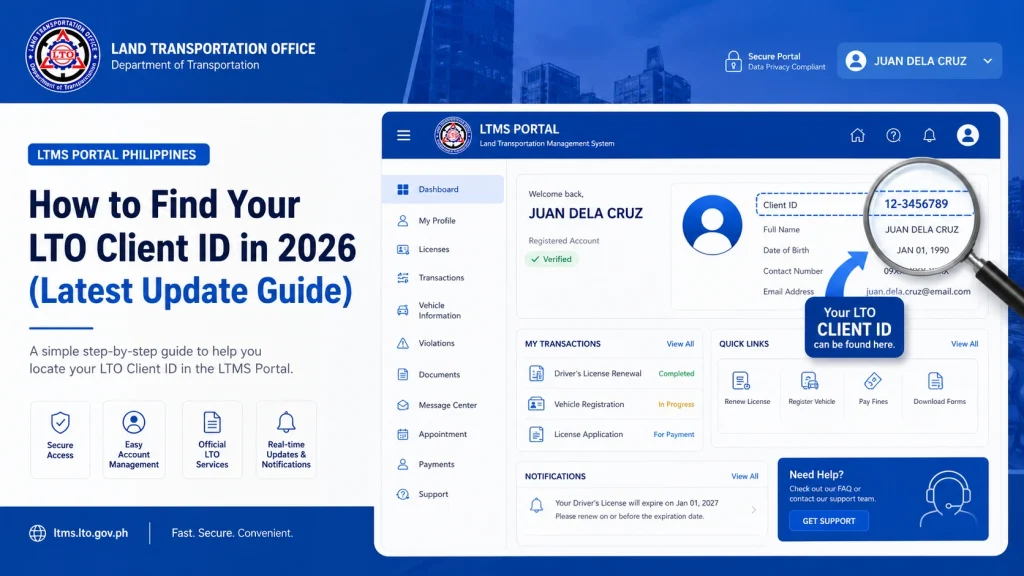
Your Client ID is usually visible in the profile section under personal details.
Once your LTMS account is linked to eGovPH, you can see your Client ID in the account or license info tab.
Your Client ID may appear on previous license renewal receipts or exam certificates.
Steps to Find Your LTO Client ID in 2026
Step 1:
Go to the official LTMS Portal and log in with your registered email.
Step 2:
Click on your profile or personal information tab.
Step 3:
Look for a field labeled Client ID. This is your unique number.
Step 4:
If it’s not visible, check your eGovPH account if linked.
Step 5:
If all else fails, visit an LTO branch or call their support line to retrieve it.
Tip: Keep your Client ID written down securely. It will save time during renewals and other transactions.
What to Do If You Forgot Your Client ID
Why the Client ID Is Important
Without your Client ID, your LTMS or eGovPH account may not fully function.
FAQs
Conclusion
Your LTO Client ID is a key part of your online driving record. Keep it safe, know where to find it, and link it to the eGovPH app for smooth license renewals in 2026. By following these steps, you can access all LTMS services and complete transactions confidently without delays.


